Shopify CRO in Practice: 5 Things That Can Actually Improve Your Conversion Rate
Date
Category
Writer
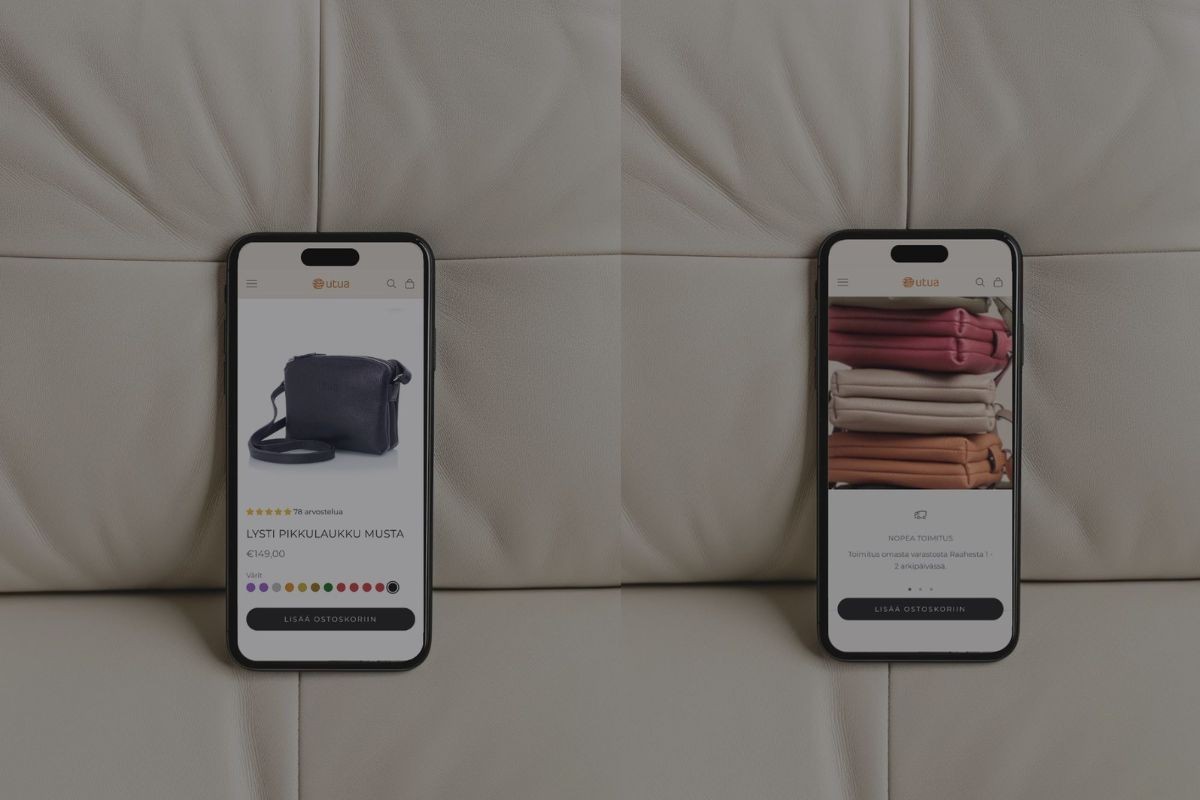
CRO is talked about a lot in e-commerce, but in practice many brands still make the same mistake: time is spent on things that look like development work but do not actually make buying easier.
Good CRO is not about constantly adding new elements, apps, and effects to your store. Good CRO is about helping the customer make a decision and removing friction from the buying journey.
Here are five practical things Shopify merchants should pay attention to if the goal is to grow sales through conversion optimization.
1. Start with mobile, not desktop
This sounds obvious, but when you build an online store, are you looking at the desktop or mobile view? Usually, all the work gets done while staring at the desktop layout, and just before launch someone quickly checks that mobile is “fine too.”
On desktop, almost everything is easier to make look good, and important elements are easier to surface quickly because there is simply more space. The problems only start to show on mobile, where screen real estate is limited and customer patience is even more limited.
If you want to improve conversion, review at least these things on mobile:
is the main call to action visible above the fold or right after the first scroll
does the customer immediately understand what you are selling
is the most important information clearly structured with headings
is the page content aligned with the stage the customer is in within the decision-making process
On mobile, every unnecessary element has a cost. If an element does not help the customer move forward, you probably do not need it.
2. Make the add-to-cart button genuinely easy to find
One of the most common problems in Shopify stores is that the add-to-cart button gets buried under other content.
On a product page, it is worth thinking carefully about which pieces of information are things you want to tell the customer, and which are things the customer actually wants to know before making a purchase decision. Everything that is absolutely critical before purchase should be available before the add-to-cart button or in its immediate vicinity.
That list can be surprisingly short:
what the product looks like
price
size, or another equivalent detail that determines whether the product is a fit
All other content placed before the add-to-cart button has just one job: to sell that specific product by making use of human cognitive biases. If you want to dive deeper into consumer decision-making, I recommend this Google article.
If the customer feels they need more information before making a decision, they will scroll further down the page. That is when clearly structured, well-labeled content becomes important. Only after that should you start offering alternatives if the information already available on the page was not enough to convince them to buy the product.
So do not force the customer to dig through information. Give them the chance to move forward with the purchase easily and quickly.
3. Present your product from the customer’s point of view
On a product page, one of the most common conversion problems is not too little interest in the product, but too little understanding.
A customer will not buy if they do not understand quickly enough:
is this right for me
why is it good
what does that matter to me
what happens next
Many online stores make one of two mistakes here: either they provide too little information, or the information is there but poorly structured.
A good product page should of course create a high-quality and trustworthy impression of the entire store, but it also needs to be extremely clear. In practice, that means, for example:
the most important benefits are visible immediately
technical details are easy to find
information that reduces purchase hesitation is clearly presented
unnecessary walls of text are removed or at least structured better
The job of a product page is not to make it look like there is a lot to say about the product and the company. Its job is to help the customer make a decision. So make sure your product page clearly communicates at least these things:
what the product looks like and how it fits
what makes the product good in its category or intended use case
how the customer’s life changes after the purchase
how payment works and when the product will arrive
Remember: the main job of the product page is to sell that product — not to push the customer toward browsing other products.
4. Your homepage shouldn’t be just a display window
In many Shopify stores, the homepage can look good, but it does not do a very good job of guiding the customer.
If the homepage is just a collection of banners, images, long text blocks, and product categories without a clear logic, it may not actually help the customer move forward. Cold traffic in particular often needs more than just “here are our products.”
A good homepage helps the customer quickly understand:
what you sell
why they should buy from you
where they should go next
Ideally, all of this should be clear before the customer even needs to scroll once. That means the challenge is mostly in visual storytelling (hero image/video), copywriting (how do you answer those three questions in one sentence above the fold?), and how successfully those two are combined.
If your homepage bounce rate is high, the problem is not necessarily the traffic. The problem may be that the customer does not immediately understand why they should continue.
Sometimes the best solution is not endless homepage tweaking, but a dedicated landing page for a specific campaign or customer segment.
5. Simplify checkout whenever possible
At checkout, many online stores lose customers unnecessarily. There may be many reasons for this, but behind it there is usually one core issue: the customer is being asked to think too much.
By the time a customer reaches checkout, the purchase decision has already been made, and your job is to make sure the only unpleasant part — giving money away — happens as easily and quickly as possible. If checkout feels long, confusing, or uncertain, conversion suffers immediately.
At minimum, check these things:
does any piece of information come as a surprise to the customer
are you asking for information you do not actually need
are your shipping and payment options clear, and do they work properly
does the entire checkout flow work smoothly on mobile
If less than half of the customers who reach checkout complete their purchase, the problem is most likely in one or more of the issues above.
Summary: CRO Does Not Require Magic Tricks
When a Shopify merchant wants to improve conversion, the most sensible first step is usually not downloading a new app. More often than not, the biggest growth opportunity is not in new features, but in making it simply easier for the customer to buy.
Good CRO often looks surprisingly ordinary from the outside. But that is exactly why it works.
And once your store is converting at a profitable level, increase your ad budget so that you allow more potential customers to find your store and buy from you.
If your online store needs more than scattered ideas, let’s talk. Brancoy’s Growth Services combine audits, clear goals, data, and continuous development work to build growth systematically and measurably.
Severi Niiranen, Shopify Account Manager

Latest Articles.
Thoughts, ideas, and perspectives on design, simplicity, and creative process.

The Shopify Migration Guide for 2025 — powered by AI
A practical guide to modern Shopify migrations.